🚀 EOS App & EOS CLI · EOS Media — Free Beta

EOS AI OS

Open-source AI coding tools — from terminal to desktop — plus a battle-tested methodology for shipping with AI agents.

EOS App turns AI conversations into shipped work in a native desktop workspace. EOS CLI puts the same Rust core in your terminal. Both are free during beta. Pair them with the AI Dev Methodology playbook to work reliably with Cursor, Claude Code, GitHub Copilot, or any agent.

✓ Open-source core, free during beta ✓ Windows · macOS · Linux ✓ Works with any OpenAI-compatible model

The EOS family

One ecosystem — from AI coding to everyday tools — and more on the way.

EOS App

FREE · BETA

Desktop AI coding workspace for real projects.

  • Windows / macOS / Linux
  • Conversations, tasks, Bash, worktrees
  • Signed Rust core, sandbox & permissions

EOS CLI

FREE · BETA

Terminal AI coding agent — TUI, headless, MCP server.

  • Interactive TUI + --print headless
  • MCP, LSP, skills, plugins, subagents
  • Any OpenAI-compatible provider

EOS Media

FREE · BETA

Local media toolbox: batch convert, compress & watermark.

  • 23 tools for images, video, audio, PDF & docs
  • Batch pipelines, GUI + CLI
  • 100% local — files never leave your machine

EOS Todo

FREE · BETA

Local-first todo app: todos, screenshots & focus timer.

  • Todos with overdue highlighting
  • Full-screen & region screenshots
  • 100% local — zero network requests

AI Dev Methodology

$19

The spec-driven playbook for shipping with AI agents.

  • 27 docs + 12 rule sets
  • Copy-paste prompt templates
  • Installable AI agent skill

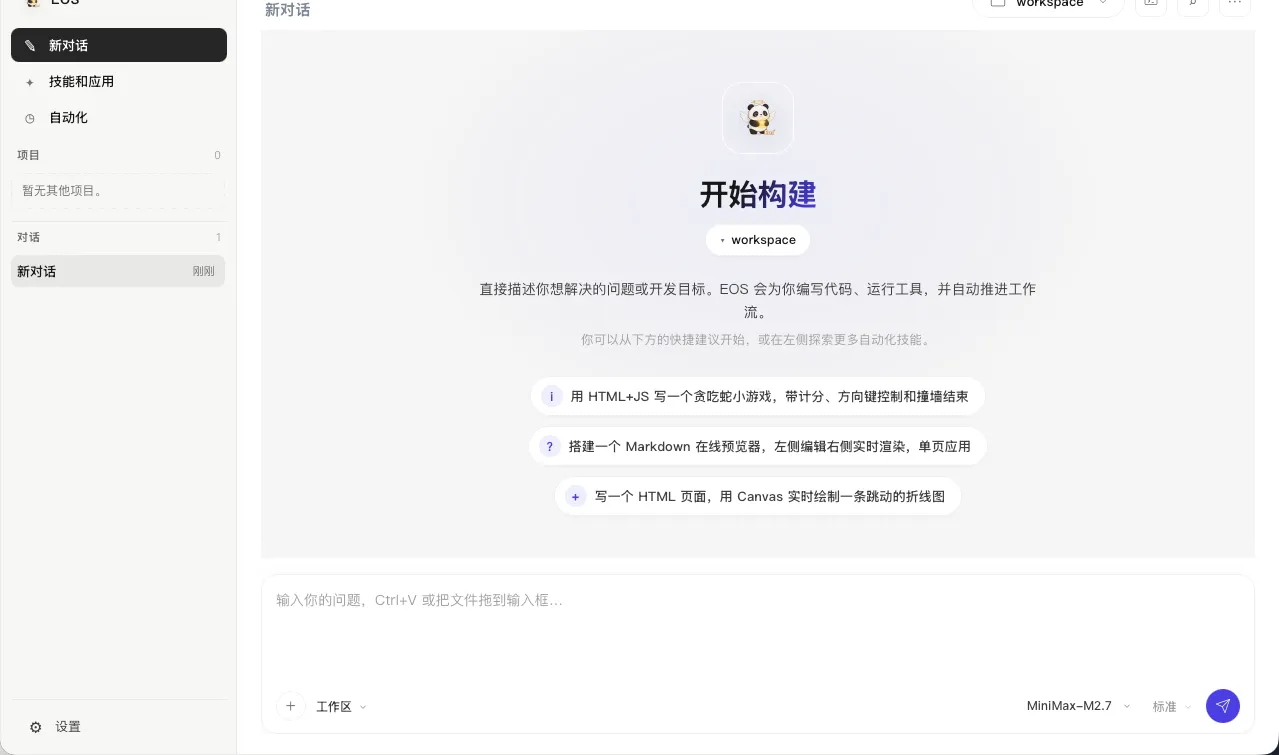
EOS App — your AI coding workspace on desktop

A native desktop workbench that turns AI conversations into shipped work. Free during beta.

EOS App main workspace on macOS: conversation area with quick-start suggestions, model input bar, and the integrated Bash terminal
  • Conversation workspace — project-focused chats with attachments and context management
  • Task center — background jobs, execution progress, and stoppable work
  • Integrated Bash — run verification commands without leaving the app
  • Worktrees, rules & context — branch-aware work, model instructions, and cost visibility
  • Skills, plugins & automation — extend the workspace your way
  • Signed Rust core — sandbox policies and permission gates built in

Windows (setup + portable) · macOS (dmg, Intel & Apple Silicon) · Linux (amd64 & arm64)

EOS CLI — the AI agent in your terminal

The same Rust core as a Go-powered CLI: interactive TUI, headless mode, and a standard MCP server. Free during beta.

eos
  • Interactive TUI with streaming Markdown, AI / Bash dual mode, and context, memory, rules & cost panels
  • plan / auto execution modes with approval gates, permission lists, and sandbox policies
  • MCP server + client, optional LSP (Go, Python, TS/JS), skills, plugins, and subagents
  • DOCX / XLSX / PDF read, write, and format conversion
  • Git & remote-repo workflows, web search and fetch
  • Works with any OpenAI-compatible provider — no vendor lock-in
One-line install curl -fsSL https://raw.githubusercontent.com/eosaios/eos/main/scripts/install.sh | bash Windows (PowerShell): irm https://raw.githubusercontent.com/eosaios/eos/main/scripts/install.ps1 | iex

EOS Media — the local media toolbox

Batch convert, compress and watermark images, video and documents in one native app. Free while in beta testing.

EOS Media
  • Images — compress, resize with platform presets, crop, watermark, EXIF removal
  • Video & audio — compress, trim, GIF export, covers, audio conversion
  • Documents — Markdown → DOCX/PDF/PNG, PDF → images, images → PDF
  • Batch pipelines — queues with honest progress, cancellable, output anti-overwrite
  • 100% local — no accounts, no uploads; your files never leave your machine
  • GUI + CLI — point-and-click or scripted batches on the same core

Windows · macOS (Intel & Apple Silicon) · Linux (amd64 — deb & AppImage)

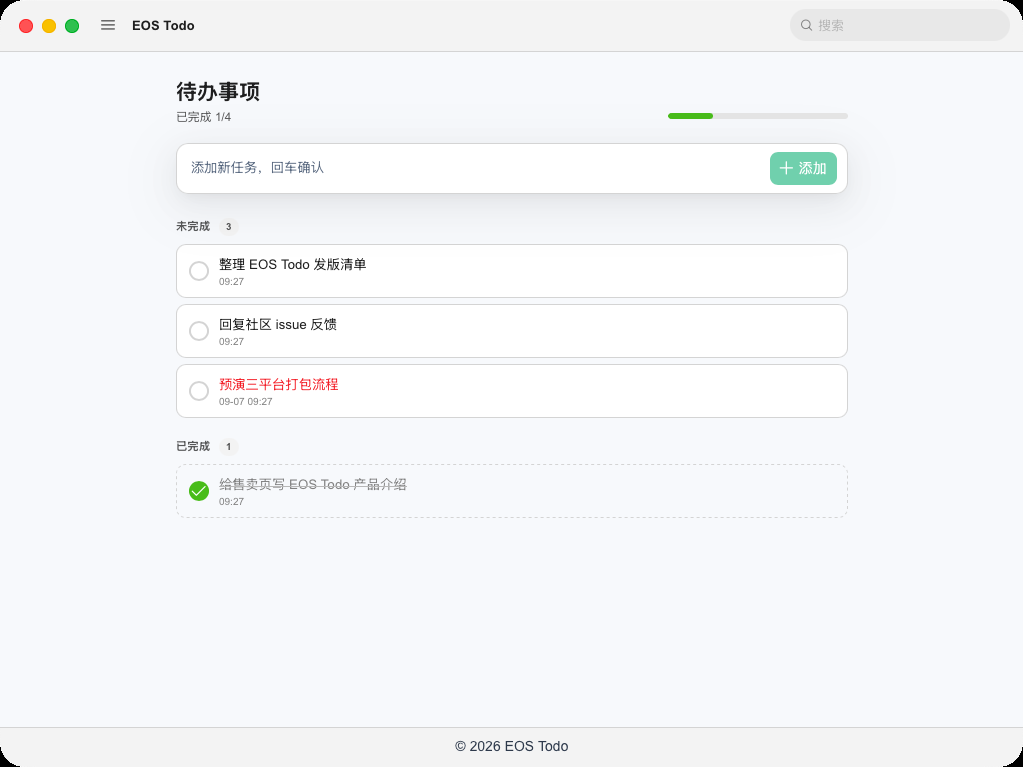
EOS Todo — the local-first todo app

Todos, screenshots and a focus timer in one native app. All data stays on your machine — no accounts, no cloud, no telemetry. Free while in beta testing.
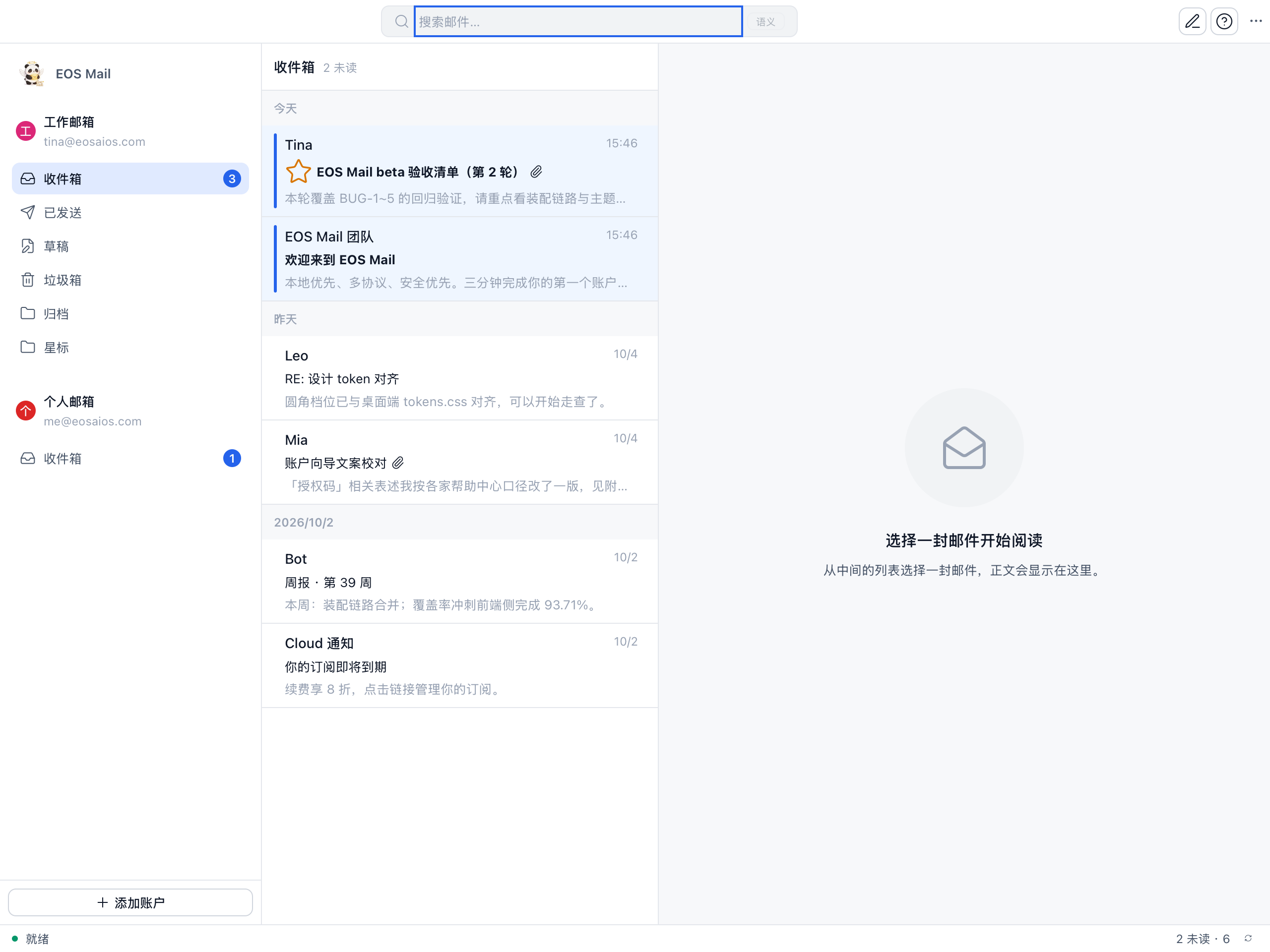
  • Todos — quick add, inline edit, complete/undo, overdue highlighting
  • Screenshot — full-screen & region capture, can exclude the app window
  • Focus timer — countdown presets with reminder popup
  • Folder explorer — browse local directories in-app
  • Shortcuts, themes & i18n — light/dark, English & Chinese
  • 100% local — zero network requests at runtime

Windows · macOS · Linux

Build smarter, ship faster

Whether you use Cursor, Windsurf, Claude Code, or GitHub Copilot, this methodology gives you a structured way to collaborate with AI so you ship more and refactor less.

  • Define scope without scope creep
  • Prompt AI for consistent, reusable output
  • Review, test, and merge with confidence
  • Scale from MVP to maintainable product
Digital Playbook $19

AI Dev Methodology

A Practical System for Shipping with AI Agents


  • 27 docs across 5 modules
  • 12 reusable rule sets
  • Copy-paste prompt templates
  • Installable AI agent skill
  • Real-world EOS example

What’s inside

A complete methodology package, ready to drop into your workflow.

01

Process

New and existing project checklists, plus the spec-driven dev loop.

  • New-Project-Doc-Checklist
  • Existing-Project-Doc-Checklist
  • Spec-Driven-Dev-Process
02

Rules

12 rule sets covering code, tests, Git, AI collaboration, security, docs, release, and more.

  • Coding · Testing · TDD Strategy
  • Git · AI Collaboration
  • Security · Documentation · ADR
  • Observability · Release/CICD · i18n · Conventions
03

Prompts

Copy-paste prompt frameworks for specs, implementation, review, and bug fixes.

  • Generic-Prompt-Structure
  • Requirement-to-Spec
  • Implement-Test
  • Review-Bug
04

Tech Stacks

Per-stack gotchas for Go, Rust, Flutter, Wails/Tauri, Web Frontend, Infra, and AI Agents.

  • Go · Rust · Flutter
  • Wails / Tauri · Web Frontend
  • Infra · AI Agents
05

Examples

A full EOS project walkthrough showing the methodology in action.

  • EOS-Example
06

Agent Skill

Install the whole bundle into Claude Code, Cursor, or any agent that supports skills.

  • SKILL.md + full references
  • install.sh one-click setup

Stack-agnostic by design

The rules stay the same; the stack guidance adapts to your project.

Go Rust Flutter Wails / Tauri Web Frontend Infra AI Agents

Built on three non-negotiables

🎯

Spec before code

Lock business correctness before AI writes a line. The confirmation gate is non-negotiable.

📊

Evidence over claims

Never trust “it works.” Demand passing tests and real output proof.

🧭

Ask in planning, execute in flow

Ask freely while planning. Once locked, execute continuously and report on completion.

What you’ll learn

A battle-tested workflow distilled into actionable steps.

🎯

Scope with clarity

Turn vague ideas into well-defined AI tasks that produce useful code on the first try.

🤖

Agent collaboration

Use the right prompts, context, and iteration loops to make AI agents truly productive.

🧪

Test & validate

Catch AI-generated errors early with lightweight review and testing checkpoints.

📦

Ship consistently

Move from prototype to production with a repeatable delivery rhythm.

🔄

Maintain over time

Keep AI-assisted codebases healthy as features and complexity grow.

📈

Scale your output

Apply the system to side projects, client work, or full product teams.

What you get after purchase

  1. Instant download — a single dev-methodology-en.zip file.
  2. Unzip — you’ll see README.md, INDEX.md, install.sh, and all 5 modules.
  3. Install — run ./install.sh --target <your-agent-skills-dir> or copy the skill/ folder manually.
  4. Start shipping — open your AI agent and point it to the methodology.

Ready to ship with AI?

Get the methodology and start turning AI agents into your most reliable shipping partner.

Become an affiliate

Love the product? Promote AI Dev Methodology and earn 25% commission on every sale.

Join the Affiliate Program

Frequently asked questions

Are EOS App and EOS CLI really free?

Yes. Both are open beta and free to use. The source code lives on GitHub, where every release can be downloaded for free.

Is EOS Media free?

Yes — EOS Media is free while in beta testing: every feature works and no account is required. Pricing for the 1.0 release will be announced later.

What is the difference between EOS App, EOS CLI, and AI Dev Methodology?

EOS App and EOS CLI share the same Rust core and are the tools you build with: App is the desktop workspace, CLI is the terminal agent. AI Dev Methodology is the paid playbook ($19) that teaches you a spec-driven process for working with AI agents in any tool — including, but not limited to, EOS.

What do EOS App and EOS CLI need to run?

Any OpenAI-compatible API endpoint (EOS_API_BASE, EOS_API_KEY, EOS_MODEL or the desktop settings page). They run on Windows, macOS, and Linux — the desktop app ships a signed Rust core, so no extra runtime is required.

What exactly is included?

27 docs in 5 modules: Process (New-Project, Existing-Project, Spec-Driven-Dev-Process), Rules (12 sets: Coding, Testing, TDD, Git, AI Collaboration, Security, Documentation, ADR, Observability, Release/CICD, i18n, Project Conventions), Prompts (Generic, Requirement-to-Spec, Implement-Test, Review-Bug), Tech Stacks (Go, Rust, Desktop/Wails-Tauri, Flutter, Web, Infra, AI Agents), Examples (EOS walkthrough) — plus an installable AI agent skill (SKILL.md + full references) and an install.sh script. Everything is delivered as a single zip download.

Which AI tools does this work with?

Any. The methodology is tool-agnostic. It works with Cursor, Windsurf, Claude Code, GitHub Copilot, and any other AI coding agent.

Do I need to be an experienced developer?

You should be comfortable building software. The methodology is designed for indie hackers, freelancers, and small teams who already code and want to ship faster with AI.

Can I use this for my team or client work?

The $19 license is for personal use. For team or commercial licensing, please contact us at [email protected].

Will I receive updates?

Yes. Lifetime updates are included with your purchase.

What is the refund policy?

This is a digital product. Because the content is delivered instantly, refunds are not offered. Please read the FAQ and contact us before buying if you have questions.

Questions?

Not sure if AI Dev Methodology is right for you? Ask anything about the system, licensing, or team usage.

⏱️ Usually replies within 24 hours

If the form does not load, you can also email directly at [email protected].